
Co-editing – when multiple people work on a shared document at the same time – has become a crucial feature for our customers. As long as you have a Microsoft 365 subscription, co-editing works particularly well in construction projects where a lot of people collaborate across different disciplines. Co-editing does not only simplify project work; it helps save significant time that could be spent on other tasks.
Seamless collaboration in digital documents
Without the ability to edit simultaneously, there's a risk that the rest of the team will be locked out of the document while one person is working on it. Or – worst-case scenario – changes might get lost due to overlapping document saves. This causes frustrating limitations, delays and unpredictability in any collaborative project.
Co-editing eliminates these risk factors: you don't have to wait for each other, you get a better overview of all document changes, and you reduce human errors. As an added bonus, it improves the overall user experience in both Microsoft 365 and Interaxo Project.
Documentation and editing are continuous tasks in construction projects, and should be able to happen simultaneously without interruptions. That's why the ability to co-edit is so helpful when dealing with contractual or technical documentation: you can collaborate more efficiently in real time, without relying on additional systems.
This is how simultaneous editing work with Interaxo Project
- Open/mark the file you want to collaborate in.
- Click on "Editing" and select "Simultaneous editing".
- Edit the document as you wish, or review other people's changes.
- Close the document when you're done.
The new version is automatically saved and immediately visible in Interaxo Project. Anyone with access to Interaxo Project can access shared documents directly in the project folder.
Microsoft 365 handles the actual document editing – everything from text changes, formatting and other updates – while Interaxo Project ensures that the changes are displayed in real time for everyone with access. You can see which users are active in the document at the same time as you, and the changes they make, at all times.
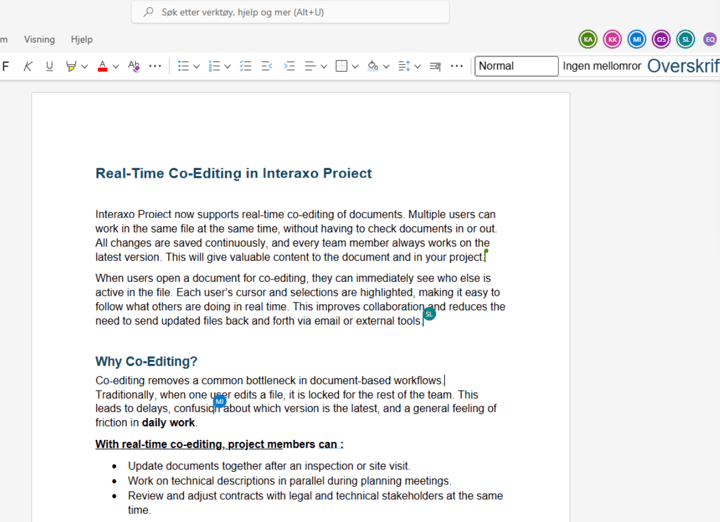
Co-editing doest not just improve your workflow; it offers an extra layer of security as your documentation always stays up to date. You get better control over all changes made to a document which, in turn, reduces the risk of human error and the consequences that follow.
The integration between Interaxo Project and Microsoft 365 contributes to safe and efficient construction projects, where you can trust that correct and up-to-date information is always at the heart of any decision that needs to be made.